fastadmin实现树型结构的方法
结果如下
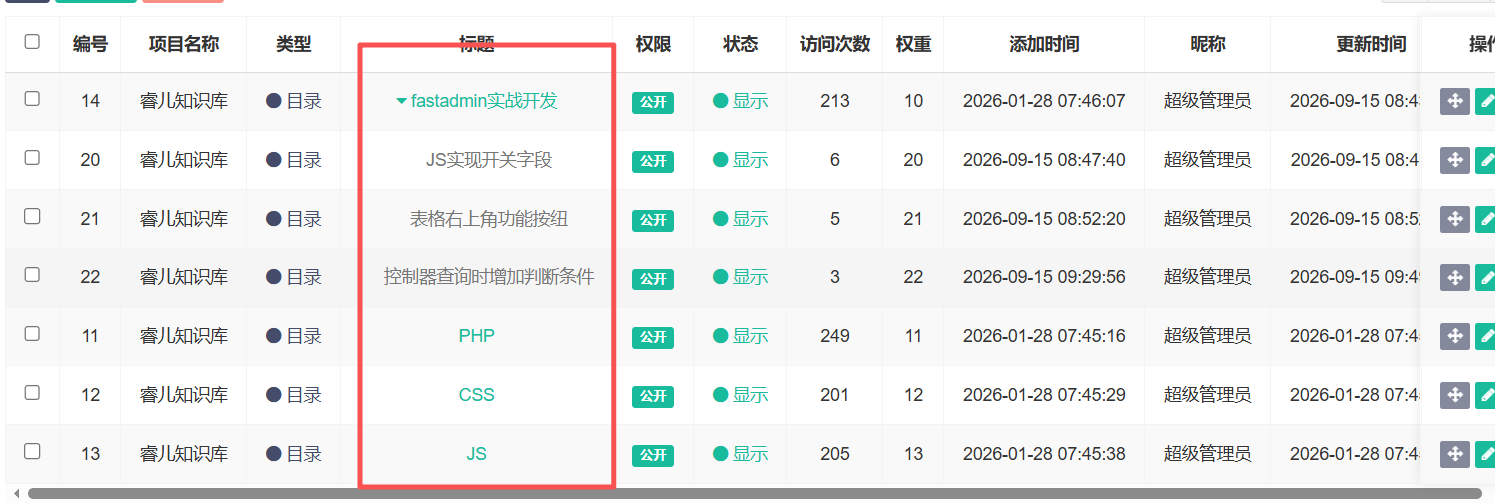
实现方法:
第一步:在控制器中先创建树型结构,然后传给视图文件。
// 创建树型结构
        $this->relationSearch = true;
        $ruleList = $this->model
        ->field('content', true)
        ->with(['admin','project'])
        //->where('project_id',$projectid)
        ->where(function ($query) use ($projectid) {
            if ($projectid) {
                $query->where('articles.project_id',$projectid);
            }
        })
        ->order('weigh ASC,id ASC')
        ->select();
        foreach ($ruleList as $row) {
            $row->getRelation('admin')->visible(['nickname']);
            $row->getRelation('project')->visible(['project_name']);
        }
        Tree::instance()->init($ruleList)->icon = ['    ', '    ', '    '];
        $this->rulelist = Tree::instance()->getTreeList(Tree::instance()->getTreeArray(0), 'title');
        //var_dump($this->rulelist);
        $ruledata = [0 => __('None')];
        foreach ($this->rulelist as $k => &$v) {
            if ($v['record_type'] === 1) {
                continue;
            }
            $ruledata[$v['id']] = $v['title'];
        }
        $this->view->assign('ruledata', $ruledata);
第二步:在JS文件中创建树型的JS
1 首先在table的配置中把分页先取消掉,然后增加隐藏下级分类的功能。
pagination: false,
search: false,
commonSearch: false,
rowAttributes: function (row, index) {
    return row.pid == 0 ? {} : {style: "display:"};
}
2 在表格绑定事件中增加对子节点的隐藏和展示控制代码
// 为表格绑定事件
            Table.api.bindevent(table);
            table.on('post-body.bs.table', function (e, settings, json, xhr) {
                //显示隐藏子节点
                $(">tbody>tr[data-index] > td", this).on('click', "a.btn-node-sub", function () {
                    var status = $(this).data("shown") ? true : false;
                    $("a[data-pid='" + $(this).data("id") + "']").each(function () {
                        $(this).closest("tr").toggle(!status);
                    });
                    if (status) {
                        $("a[data-pid='" + $(this).data("id") + "']").trigger("collapse");
                    }
                    $(this).data("shown", !status);
                    $("i", this).toggleClass("fa-caret-down").toggleClass("fa-caret-right");
                    return false;
                });
            });

            //隐藏子节点
            $(document).on("collapse", ".btn-node-sub", function () {
                if ($("i", this).length > 0) {
                    $("a[data-pid='" + $(this).data("id") + "']").trigger("collapse");
                }
                $("i", this).removeClass("fa-caret-down").addClass("fa-caret-right");
                $(this).data("shown", false);
                $(this).closest("tr").toggle(false);
            });
        },
3 在API方法增加对标题的格式化
api: {
formatter: {
title: function (value, row, index) {
value = value.toString().replace(/(&|&)nbsp;/g, ' ');
var caret = row.haschild == 1 ? '<i class="fa fa-caret-down"></i>' : '';
value = value.indexOf(" ") > -1 ? value.replace(/(.*) /, "$1" + caret) : caret + value;
value = row.pid !== 0 ? "<span class='text-muted'>" + value + "</span>" : value;
return '<a href="javascript:;" data-shown="true" data-id="' + row.id + '" data-pid="' + row.pid + '" class="'
+ (row.haschild == 1 ? 'text-success' : 'text-success') + ' btn-node-sub">' + value + '</a>';
}
},
bindevent: function () {
Form.api.bindevent($("form[role=form]"));
}
}4 调整字段处对标题的格式化
{field: 'title', title: __('Title'), formatter: Controller.api.formatter.title, clickToSelect: !false},至此树型结构成功,之前对文档系统的文章使用了树型结构,但考虑到内容后续会越加越多,树型一页显示加载负担太重,所以文档系统改回正常显示方式,树型参考可以看默认的菜单规则,里面的JS比我写的更多一些。